state vs props
state 的主要作用是用于组件保存、控制、修改自己的可变状态。state 在组件内部初始化,可以被组件自身修改,而外部不能访问也不能修改。你可以认为 state 是一个局部的、只能被组件自身控制的数据源。state 中状态可以通过 this.setState 方法进行更新,setState 会导致组件的重新渲染。
props 的主要作用是让使用该组件的父组件可以传入参数来配置该组件。它是外部传进来的配置参数,组件内部无法控制也无法修改。除非外部组件主动传入新的 props,否则组件的 props 永远保持不变。
组件的生命周期
我们把 React.js 将组件渲染,并且构造 DOM 元素然后塞入页面的过程称为组件的挂载。
Mounting
These methods are called in the following order when an instance of a component is being created and inserted into the DOM:
- constructor()
- static getDerivedStateFromProps()
- render()
- componentDidMount()
Note:
These methods are considered legacy and you should avoid them in new code:
- UNSAFE_componentWillMount()
Updating
An update can be caused by changes to props or state. These methods are called in the following order when a component is being re-rendered:
- static getDerivedStateFromProps()
- shouldComponentUpdate()
- render()
- getSnapshotBeforeUpdate()
- componentDidUpdate()
Note:
These methods are considered legacy and you should avoid them in new code:
- UNSAFE_componentWillUpdate()
- UNSAFE_componentWillReceiveProps()
Unmounting
This method is called when a component is being removed from the DOM:
- componentWillUnmount()
Error Handling
This method is called when there is an error during rendering, in a lifecycle method, or in the constructor of any child component.
- componentDidCatch()
bind() 和 () => {} 的 this
箭头函数的函数体内的 this 就是定义时候的 this。即在定义箭头函数的时候就已经绑定了 this,可以理解为就是在定义的时候,通过 bind 函数进行强行绑定 this。
setState() 的用法
如果更新的 state 中的字段依赖于当前 state 中的结果,则不能使用 this.setState({}) 来更新
1 | ... |
带有回调的用法
1 | setState(updater, callback) |
forceUpdate()
1 | component.forceUpdate(callback) |
By default, when your component’s state or props change, your component will re-render. If your render() method depends on some other data, you can tell React that the component needs re-rendering by calling forceUpdate().
Calling forceUpdate() will cause render() to be called on the component, skipping shouldComponentUpdate(). This will trigger the normal lifecycle methods for child components, including the shouldComponentUpdate() method of each child. React will still only update the DOM if the markup changes.
Normally you should try to avoid all uses of forceUpdate() and only read from this.props and this.state in render().
高阶组件(Higher-Order Components)
高阶组件就是一个函数,传给它一个组件,它返回一个新的组件。
1 | const NewComponent = higherOrderComponent(OldComponent); |
这个新的组件会使用你传给它的组件作为子组件,我们看看一个很简单的高阶组件:
1 | import React, { Component } from 'react' |
context
一个组件可以通过 getChildContext 方法返回一个对象,这个对象就是子树的 context,提供 context 的组件必须提供 childContextTypes 作为 context 的声明和验证。
如果一个组件设置了 context,那么它的子组件都可以直接访问到里面的内容,它就像这个组件为根的子树的全局变量。任意深度的子组件都可以通过 contextTypes 来声明你想要的 context 里面的哪些状态,然后可以通过 this.context 访问到那些状态。
context 打破了组件和组件之间通过 props 传递数据的规范,极大地增强了组件之间的耦合性。而且,就如全局变量一样,context 里面的数据能被随意接触就能被随意修改,每个组件都能够改 context 里面的内容会导致程序的运行不可预料。
但是这种机制对于前端应用状态管理来说是很有帮助的,因为毕竟很多状态都会在组件之间进行共享,context 会给我们带来很大的方便。一些第三方的前端应用状态管理的库(例如 Redux)就是充分地利用了这种机制给我们提供便利的状态管理服务。但我们一般不需要手动写 context,也不要用它,只需要用好这些第三方的应用状态管理库就行了。
1 | import React, { Component } from 'react'; |
Flux
官方介绍:In Depth Overview
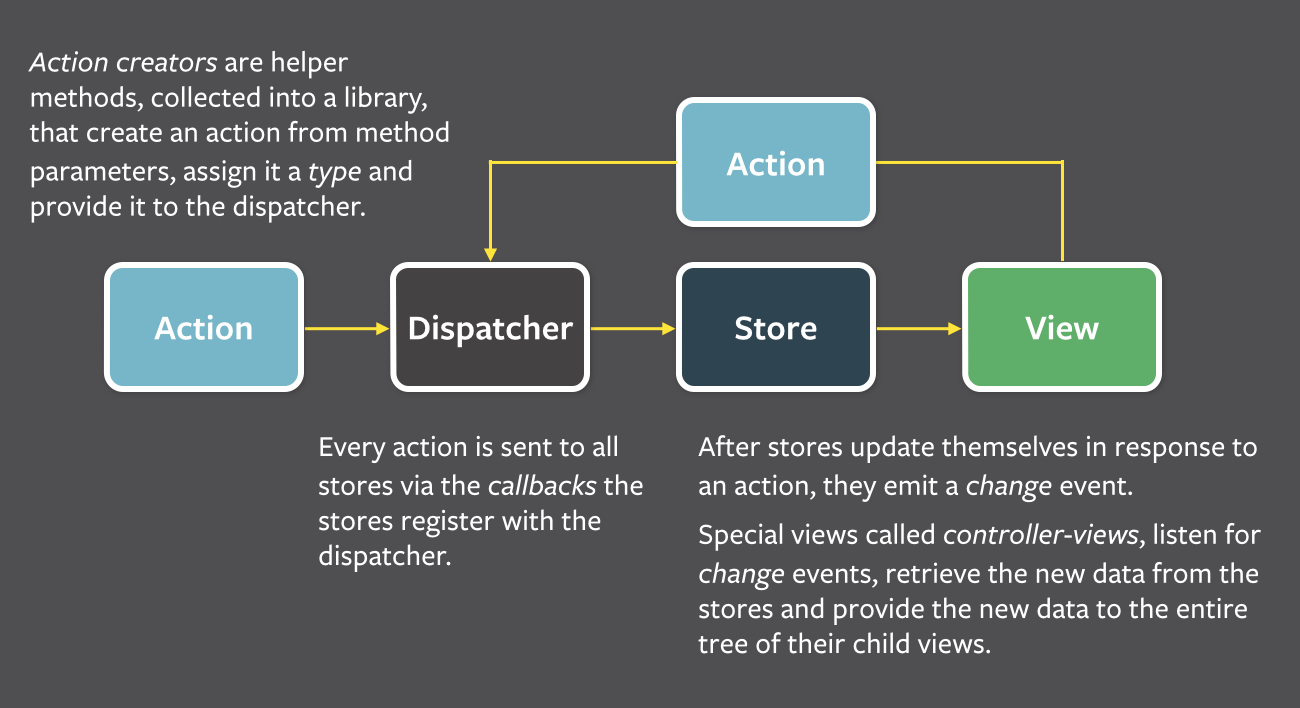
Flux 是 Facebook 用于构建 client-side web 应用程序的一个系统架构。它通过利用单向数据流来补充React的可组合视图组件。它更像是一种模式,而不是一个正式的框架。
Data in a Flux application flows: