frame:该view在父view坐标系统中的位置和大小
bounds:该view在本身坐标系统中的位置和大小
center:该view的中心点在父view坐标系统中的位置和大小
其实本地坐标系统的关键就是要知道他的原点(0, 0)在什么位置(这个位置是相对于上层view的本地坐标系统而言的,最上层view就是window,他的本地坐标系统原点就是屏幕的左上角了)。
通过修改view的bounds属性可以修改本地坐标系统的原点位置,进而影响到“子view”的显示位置。
1 | UIView *viewA = [[UIView alloc] initWithFrame:CGRectMake(20, 20, 200, 200)]; |
以上代码运行效果:
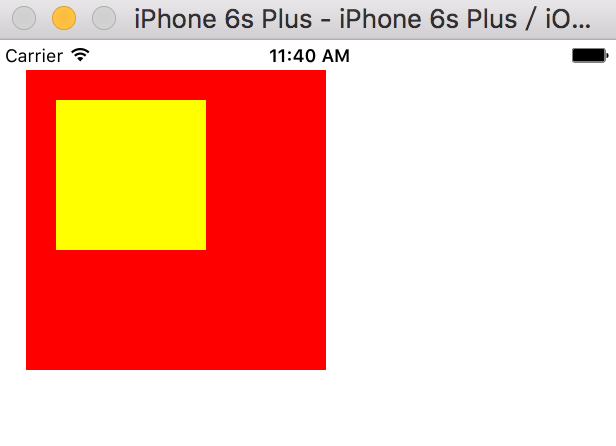
bounds和frame的值:
1 | viewA.frame:{{20, 20}, {200, 200}}, viewA.bounds:{{-30, -30}, {200, 200}} |
[viewA setBounds:CGRectMake(-30, -30, 200, 200)]
修改为:
[viewA setBounds:CGRectMake(-30, -30, 245, 245)]
运行效果:
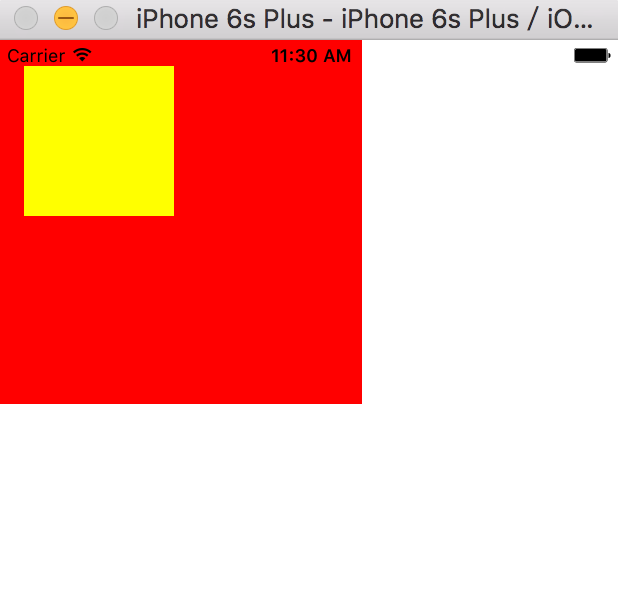
bounds和frame的值:
1 | viewA.frame:{{-2.5, -2.5}, {245, 245}}, viewA.bounds:{{-30, -30}, {245, 245}} |
bounds可以通过修改自己坐标系原点的位置来影响“子view”的显示位置。
bounds可以改变frame,如果bounds比frame大,那么frame也会随之变大。